
High-Brightness PTZ Teleprompters for Studio Use

High-Brightness PTZ Teleprompters for Studio Use
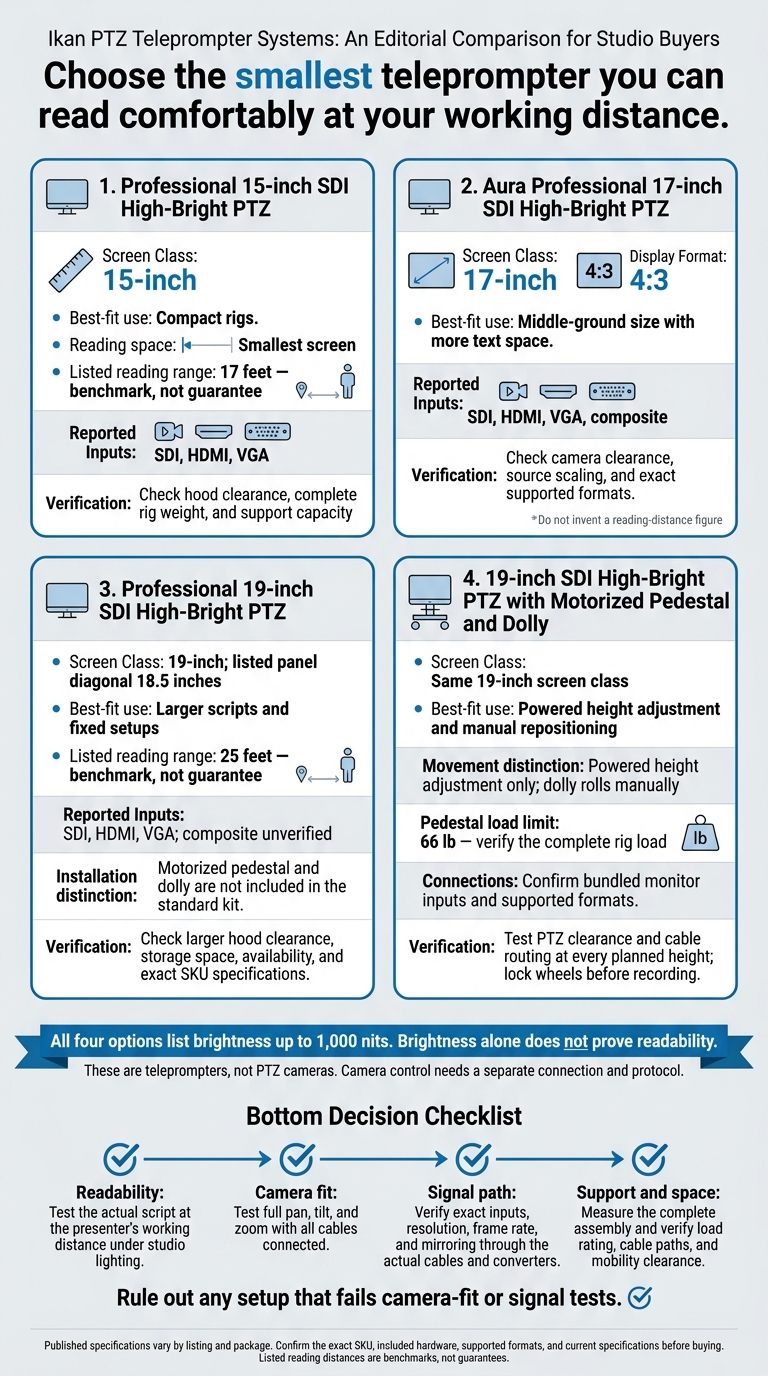
I’d choose the smallest teleprompter you can read comfortably at your working distance - not just the largest screen. Ikan’s four options list brightness up to 1,000 nits, but camera clearance, video inputs, and support capacity matter just as much.
My shortlist: the 15-inch for compact rigs, the 17-inch Aura for more text space, the 19-inch for larger scripts, and the 19-inch pedestal bundle for powered height adjustment and manual rolling.
Quick Comparison
| Ikan system | Reading space | Camera fit and connections | Space and mobility |
|---|---|---|---|
| Professional 15-inch SDI High-Bright PTZ | Smallest screen; listed 17-foot reading range | Check hood clearance; SDI, HDMI, VGA | Compact-rig option |
| Aura Professional 17-inch SDI High-Bright PTZ | 4:3 screen with more text space | Check hood clearance; SDI, HDMI, VGA, composite | Middle-ground size |
| Professional 19-inch SDI High-Bright PTZ | Largest screen class; listed 25-foot reading range | Check hood clearance; SDI, HDMI, VGA | Better suited to fixed setups |
| 19-inch SDI High-Bright PTZ with motorized pedestal and dolly | Same 19-inch screen class | Test clearance and cables through height changes; confirm bundled inputs | Powered height adjustment; manually rolled dolly |
Listed reading distances are benchmarks, not guarantees. These are <u>teleprompters, not PTZ cameras</u>: camera movement still needs separate controls.
Before buying, I’d test your script under studio lights, run the camera through its planned movements, and check mirroring through your actual video cables. I’d also confirm the complete rig’s weight, package contents, and current USD price - some listings disagree.
Ikan PTZ Teleprompters: Studio Buying Guide
1. Ikan Professional 15-inch SDI High-Bright PTZ Teleprompter
Reading Clarity
This model keeps scripts readable on compact studio rigs without taking over the set. Its 15-inch monitor pairs a 1,920 × 1,080 resolution with up to 1,000 cd/m² brightness and 65/35 beamsplitter glass.
Treat the listed 17-foot reading range as a benchmark, not a guarantee. From the farthest planned presenter position, test punctuation, line breaks, font size, and scroll speed. Keep the studio’s key, fill, and backlights on during the test.
PTZ Movement Clearance
The listed PTZ riser is about 2.01 inches high. The hood measures about 19.06 × 15.31 inches at the top and 8.16 × 15.31 inches at the bottom.
Before buying, check that the camera body, lens, plate, and connectors fit within the hood. After installation, test the full pan, tilt, and zoom range. Move slowly and check lens alignment behind the beamsplitter, then repeat with SDI, power, tally, and control cables connected.
Display and Signal Compatibility
Listed inputs include 3G-SDI, HDMI, and VGA, with 12V DC power. Check the source resolution, frame rate, connector type, and cable length. Confirm horizontal flip works, then rehearse while checking for glare, edge reflections, moiré, or anything blocking the frame.
Rig Footprint and Mobility
The monitor measures about 15.7 × 10.6 × 1.1 inches, but the hood determines how much clearance the rig needs. The aluminum body includes 1/4"-20 and 3/8"-16 mounting points for compatible supports.
Before moving the rig, check the support’s payload rating against the weight of the complete assembly. The compact 15-inch model serves as the size reference for the larger 17-inch option that follows.
sbb-itb-4a26d6a
2. Ikan Aura Professional 17-inch SDI High-Bright PTZ Teleprompter
Reading Clarity
The Aura pairs a 17-inch display with 1,280 × 1,024 resolution, 1,000-nit brightness, and a 65/35 beamsplitter. It offers more usable text space than the 15-inch model without a big increase in footprint. Test text size from your presenter’s position to see whether this middle-ground option gives you enough extra reading room without moving to a larger rig.
PTZ Movement Clearance
Start with the PTZ riser, then check every saved position for hood clearance, cable tension, and lens centering. Test across the full pan, tilt, and zoom range.
Display and Signal Compatibility
Listed inputs include 3G-SDI, HDMI, VGA, and composite, but the documentation doesn’t confirm every supported SDI frame rate. The 4:3 panel can affect how source video scales, so check your exact output format, orientation, and text shape before going live. Make sure cable routing also leaves enough room for the camera’s remote movement.
Rig Footprint and Mobility
The monitor measures approximately 15.5 × 13.75 × 1 inch, and the listed teleprompter height is around 16.1 inches. Plan footprint, transport space, and support capacity using the full package dimensions and operating load - not just the listed 16-pound base weight. This matters especially in shared studios and mobile builds.
3. Ikan Professional 19-inch SDI High-Bright PTZ Teleprompter
Reading Clarity
If the 17-inch model feels cramped with larger scripts, this 19-inch version offers more reading space - but takes up more studio space. The PT419W-PTZ-TK is sold as a 19-inch model, with a listed 18.5-inch diagonal, 1,920 × 1,080 native resolution, and 1,000-nit brightness.
The larger panel leaves more room for bigger type. Treat the 25-foot readability claim as a benchmark, not a guarantee. Test it from your farthest presenter position in your studio.
PTZ Movement Clearance
The larger hood needs more clearance, especially with taller camera bodies and longer lenses. Ikan says its enclosed hood allows PTZ movement with most cameras, but check your camera’s body, lens position, and mounting height against the hood and riser.
Test the camera’s movement around the glass, hood, riser, cables, and plate. Pay extra attention when using larger camera bodies and mounts.
Display and Signal Compatibility
This SKU lists SDI, HDMI, and VGA inputs. Don’t assume composite input is included. Confirm the supported SDI frame rates for this exact SKU rather than relying on specs for related models.
Rig Footprint and Mobility
The bigger screen comes with a larger hood, making this model better suited to a rig that stays put. The hood measures about 19.06 inches wide at the top, 15.31 inches wide at the bottom, and 12.56 inches high - a fit for permanent or semi-permanent installations.
The wheeled case measures about 26.75 × 26.5 × 15.62 inches externally. Check your storage and transport space before ordering, especially if readability matters more to you than portability. The motorized pedestal and dolly come in a separate package; they aren’t part of the standard kit.
Ikan PTZ Teleprompter Setup Tutorial
4. Ikan Professional 19-inch SDI HB PTZ Teleprompter with Motorized Pedestal and Dolly
This package stays in the 19-inch teleprompter class, but adds a motorized pedestal for studio height adjustments. Ikan lists it at $6,949, pairing the PT419W-PTZ teleprompter with the M-PTZ motorized pedestal and dolly. Check exactly what ships - don’t assume a camera, controller, or talent monitor comes with it.
Reading Clarity
Test readability under production lighting. Look for hotspots, double images, and reduced camera contrast through the 65/35 beamsplitter. Once the text is readable, check that the camera clears the hood at every planned pedestal height.
PTZ Movement Clearance
At the lowest and highest planned pedestal positions, test clearance across the full pan, tilt, and zoom range. Keep a controlled cable loop, secure cable runs to the support, and keep loose cables away from the wheels.
Display and Signal Compatibility
Send a known 1080p signal through your intended signal path. Check mirrored orientation, cropping, aspect ratio, and refresh stability.
Rig Footprint and Mobility
The pedestal powers height adjustment only; the dolly rolls manually. Check the full rig’s weight against the pedestal’s 66 lb limit, and make sure the assembled setup fits through studio lanes and doorways. Lock the dolly before recording. Also verify that you can move between planned set positions without rerouting cables or repeating clearance checks each time.
Script Readability Under Studio Lighting
Brightness, Resolution, and Reading Distance
Test each teleprompter at the presenter’s working distance under studio lighting. To compare the four Ikan systems on equal terms, keep the script, distance, lighting, and starting scroll speed the same. Begin with a readable font size, then increase contrast until the text stays crisp under bright overhead light.
Adjust font size and scroll speed until the presenter can read at a natural pace. If the text sits too high or low, resize or reposition the window to keep it near the lens axis.
Testing Readability at Presenter Distance
Use landscape mode to reduce vertical eye movement, and use manual scrolling only during testing. Watch for glare, washed-out text, and unnecessary eye movement as the presenter reads.
Record the final settings and working distance so you can compare systems using test results rather than assumptions. Once readability is set, move to camera clearance and remote movement.
PTZ Camera Fit and Remote Control
After readability, check whether the camera fits and can move freely. Use the same fit and control checks across all four systems. PTZ-ready refers to the teleprompter - it doesn’t guarantee automatic camera control or enough clearance for every movement. Confirm that the camera clears the hood throughout its full pan, tilt, and zoom range.
A prompting video feed doesn’t control the camera. Remote control needs a separate protocol and connection. In solo setups, control wiring often gets overlooked until the prompt feed is working. Check control compatibility and leave enough cable slack for the camera’s full range of motion. Treat teleprompter fit, daily camera control, and reliable cabling as separate checks.
On the motorized pedestal package, also test cable routing as the height changes and the dolly rolls.
Monitor Connections and Prompting Software
Video Inputs and Signal Formats
Once you’ve checked the physical fit, confirm the signal path that feeds the monitor. The table below lists reported features, but source documents differ on some specifications.
| Monitor feature | 15-inch SDI High-Bright PTZ | 17-inch Aura SDI High-Bright PTZ | 19-inch SDI High-Bright PTZ | 19-inch with motorized pedestal and dolly |
|---|---|---|---|---|
| Reported inputs | SDI, HDMI, VGA | SDI, HDMI, composite, VGA | SDI, HDMI, VGA; composite unverified | SDI, HDMI, composite, VGA |
| 3G-SDI support | Reported | Reported | Reported | Reported |
| Supported input formats | HDMI up to 1080p reported; exact formats unspecified | Exact formats unspecified | Exact formats unspecified | Exact formats unspecified |
| Loop-through outputs | SDI reported | SDI reported | SDI reported | SDI reported |
| Image-flip controls | Horizontal and vertical reported | Horizontal and vertical reported | Horizontal and vertical reported | Horizontal and vertical reported |
Before ordering, confirm the exact package and supported formats with the manufacturer.
Input support alone doesn’t tell you the native resolution or frame-rate limits. Ask for the monitor manual and supported-format table, including 3G-SDI support, before choosing a computer output or converter.
After confirming the input format, test mirroring through the actual signal chain.
Image Flipping and Output Tests
Use either hardware flip or software mirroring - not both. Before talent arrives, test the computer, adapters, converters, full cable run, and monitor together.
- Blank screen: Check the selected input, resolution, and refresh rate.
- Clipped or stretched text: Check scaling and aspect ratio.
If you’re using SDI, confirm that any HDMI-to-SDI converter sends a format the monitor accepts. Run the script at the font size and scrolling speed you’ll use during production, then save the working output settings.
Test any SDI loop-through separately. Its presence doesn’t mean the system includes an independent talent monitor.
Evelize for Solo-Creator Workflows
For solo creators, script settings should match the teleprompter feed. Evelize supports script creation, organization, and search. It also lets you adjust scrolling speed, font size, and background color for script preparation and rehearsal.
Rig Space, Support, and Mobility
Once you’ve checked signal compatibility, make sure the full rig fits your studio and support system. Published listings for all four systems lack full assembled dimensions, rig weight, and support ratings.
Start with desk-mounted builds, then check floor and pedestal setups.
Desk Clearance and Support Capacity
Measure the assembled rig’s width, depth, and height at the intended presenter distance. Leave room for controls, cables, lighting, and the camera’s full PTZ travel.
Before choosing a desk mount, tripod, or pedestal, confirm the mounting interface and any required plates or adapters. Check the total rig weight - including the camera, cables, and accessories - against the support’s load rating. Verify balance and compatibility, too.
Motorized Pedestal and Dolly Setup
- Verify the included hardware, minimum and maximum working heights, rated load, power requirements, and dolly dimensions.
- Leave floor space for the base and its travel path. Check overhead clearance at maximum height.
- Allow enough cable slack for the full height range, while keeping cables clear of wheels and moving joints.
- Confirm how to lock the wheels before use.
Pros and Cons of Each System
The table below turns the earlier specs into buying tradeoffs. It keeps documented features separate from performance that still needs testing.
| System | Pros | Cons and verification needs |
|---|---|---|
| Ikan Professional 15-inch SDI High-Bright PTZ Teleprompter | Fits compact studios. It has the smallest screen, 1,000 cd/m² brightness, and SDI/HDMI/VGA inputs. | Less room for text, and source specs disagree on native resolution. Check readability, camera fit, and cable clearance. |
| Ikan Aura Professional 17-inch SDI High-Bright PTZ Teleprompter | A middle-ground choice for smaller studios that need more reading room. It offers a 17-inch, 4:3 display, 1,000 cd/m² brightness, and 65/35 glass without a large increase in footprint. | It doesn’t fit every PTZ camera. Check camera clearance, readability under studio lighting, and the inputs and support components included in the package. |
| Ikan Professional 19-inch SDI High-Bright PTZ Teleprompter | Suits fixed installations that need a larger reading surface. Specs include 1,000 cd/m² brightness, 70/30 glass, SDI/HDMI/VGA inputs, and a listed 25-foot reading range. | The rig takes up more space. Test the reading range and PTZ clearance. One listing marks it discontinued, so confirm availability and support. |
| Ikan Professional 19-inch SDI HB PTZ Teleprompter with Motorized Pedestal and Dolly | Best suited to fixed or semi-fixed studios that need powered height adjustment and mobility. It makes height changes and repositioning easier. | Requires more floor space. Keep its 39.4-inch footprint and cable-guard area clear. Check movement smoothness, performance on your floor, PTZ clearance, and bundled monitor connections. |
Brightness and glass ratios alone don’t prove better readability or camera image quality. Likewise, an input type doesn’t confirm loop-through, image flip, or frame-rate support.
Next, compare these tradeoffs with your studio’s space, support needs, and camera movement.
Choosing a System for Your Studio
After comparing brightness, clearance, and footprint, use these weights as a planning guide - not a product ranking. If a setup fails a camera-fit or signal test, rule it out, no matter how well it performs elsewhere.
| Decision factor | Weight | Assessment to record |
|---|---|---|
| Reading clarity | 30% | Check readability under studio lighting at the presenter’s distance |
| PTZ clearance | 25% | Check full PTZ travel and cable clearance |
| Signal compatibility | 25% | Check exact inputs, output routing, image flip, resolution, and frame rate |
| Footprint and mobility | 20% | Check hood dimensions, support hardware, wheel clearance, and storage space |
Choose the 15-inch for compact rigs, the 17-inch for a middle ground, or the 19-inch for maximum reading space. Pick the pedestal bundle for height-adjustable mobility - not better clarity or signal support.
Solo creators should give mobility more weight. Fixed studios should put more weight on readability, PTZ clearance, and signal compatibility.
Use the shortlist above to narrow your options, then confirm the exact build before buying. Test camera fit, readability at the presenter’s distance, monitor inputs, image flip, and output using your actual cables and settings.
Measure desk or floor space, confirm load capacity, map cable and power paths, and check access to the wheel locks. Solo creators should also verify that one person can handle assembly and teardown.
FAQs
How can I reduce visible eye movement while reading?
Match your screen size in inches to your camera distance in feet. Aim to stay 6–10 feet away when possible, and keep your script within 1–2 inches of the lens center.
Read in phrases, not word by word. Use your peripheral vision to scan upcoming lines while keeping your gaze on the lens. In Evelize, adjust the font size and text margins to center the script and reduce eye movement.
Will beamsplitter glass affect my camera’s exposure?
Yes. Beamsplitter glass slightly reduces the light reaching your camera’s sensor. Most professional teleprompters use a 70/30 transmission-to-reflection ratio: 70% of the light passes through to the lens, while 30% reflects to display the script.
Use manual camera settings to keep exposure consistent. Auto-exposure may respond incorrectly to the glass or the reflected brightness of the teleprompter screen.
How can I manage prompting and PTZ controls alone?
Control scrolling speed and direction with Bluetooth remotes, foot pedals, or gamepads - no assistant needed. In Evelize, adjust script formatting, font size, and scrolling speed to match your natural pace.
For complex studio setups, IP-based workflows over Ethernet let you manage scripts in real time. Before recording, lock your camera’s focus and exposure to keep video quality consistent while you handle the script.
Related Posts
Ready to Elevate Your Content?
Try Evelize for free and experience the easiest way to create, edit, and share professional videos. Script writing, teleprompter, and powerful video tools - all in one app!

