
Top Features to Look for in Teleprompter Monitors

Top Features to Look for in Teleprompter Monitors
Teleprompter monitors are purpose-built to improve on-camera script reading. They display mirrored text that you can read while maintaining eye contact with your audience. Choosing the right monitor involves evaluating key features that directly impact your performance.
Key Features to Consider:
- Brightness & Contrast: Look for 400–600+ nits for clear visibility under studio lights and high contrast for reduced eye strain.
- Screen Size & Resolution: Match screen size to your viewing distance (e.g., 10" for 10 ft). Opt for Full HD or 4K for crisp text.
- Mirroring Options: Built-in hardware mirroring ensures text displays correctly without additional software.
- Refresh Rate: A higher refresh rate (e.g., 120Hz) ensures smooth text scrolling, minimizing motion blur.
- Connectivity: HDMI is common, but professional setups may require HD-SDI or Ethernet for advanced workflows.
- Build Quality: Durable materials like metal frames and low-iron glass ensure reliability for frequent use.
Pairing these features with a teleprompter app like Evelize enhances usability, offering tools like adjustable scrolling speed, font customization, and real-time script management.
Quick Tip: A monitor with the right brightness, resolution, and mirroring capabilities can transform your delivery from awkward to polished.
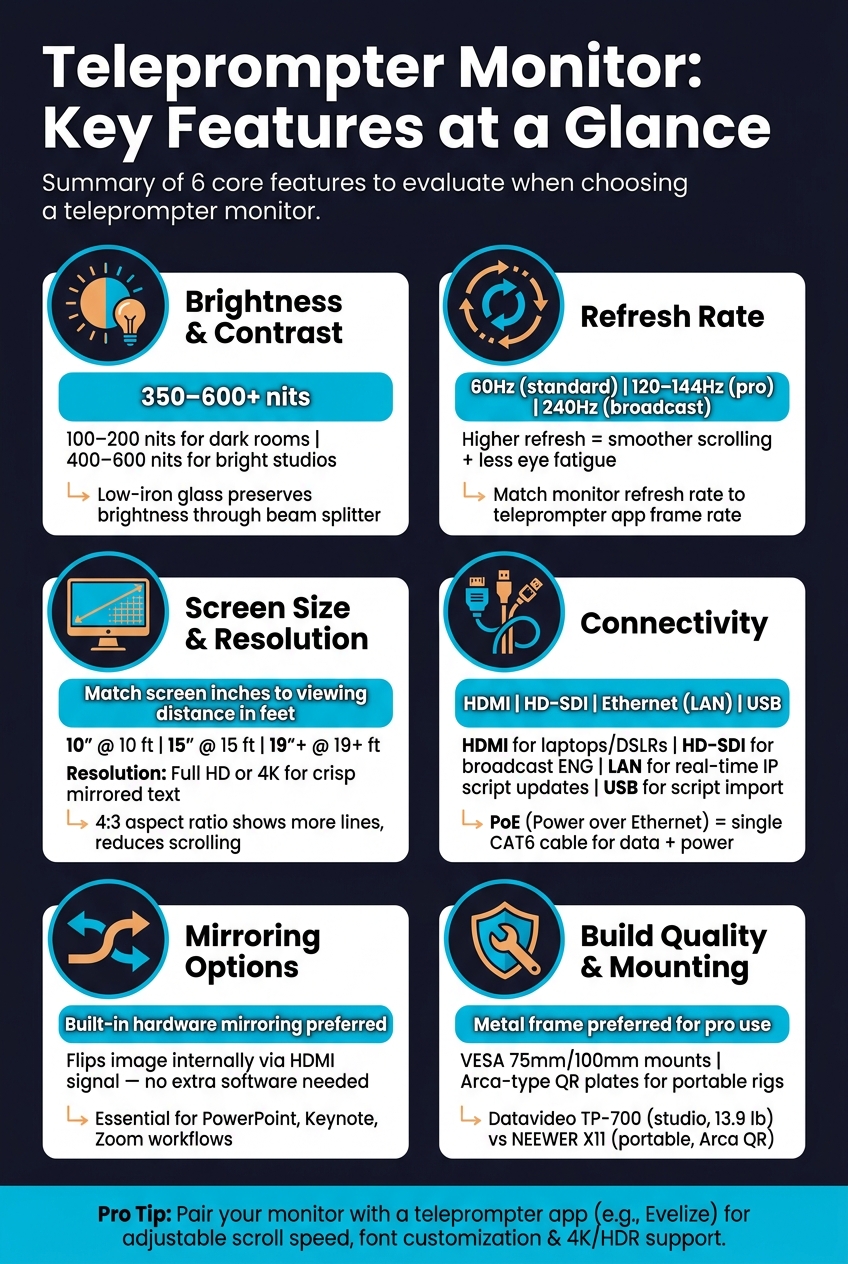
Teleprompter Monitor Features: Specs & Best Use Cases
The Right Monitor for My Teleprompter!
sbb-itb-4a26d6a
1. Brightness and Contrast
Filming under studio lights can be tricky for teleprompter monitors. The intense ambient light often competes with the screen, making the reflected text on the beam splitter glass harder to see. If the screen isn’t bright enough, the text can appear washed out, leading to squinting, leaning, or even losing your place in the script. The result? Awkward delivery on camera. This is where understanding screen brightness, measured in nits, becomes essential.
What are nits? Nits measure the brightness of a screen (candelas per square meter). For most indoor studios, 350 nits is a good baseline. However, brighter environments may call for 400–600 nits, while darker rooms typically only need 100–200 nits.
Contrast ratio is just as critical as brightness. A sharp contrast between the white text and a dark background makes reading the script easier and reduces eye strain. On the other hand, poor contrast can force your eyes to work harder, leading to subtle but noticeable discomfort. Adjusting the settings in your teleprompter app to maximize contrast can make a significant difference in your shooting environment.
The type of glass in your teleprompter also matters. Low-iron glass, like the 70/30 beam splitter used in monitors such as the Datavideo TP-700, maintains both brightness and contrast. Using a high-brightness monitor with lower-quality, tinted glass can cancel out any performance gains.
Another tip? Add a shroud or hood around the monitor and beam splitter glass to block stray light from entering the assembly. This simple addition helps maintain contrast without needing to push the screen’s brightness to its maximum setting. By fine-tuning both your screen settings and physical setup, you’ll ensure your on-camera delivery stays smooth and professional.
2. Screen Size and Resolution
Once you've fine-tuned brightness and contrast, the next step is to focus on screen size and resolution. These factors play a big role in making on-camera reading smooth and natural. The wrong screen size can lead to excessive eye movement, making it clear you're reading from a teleprompter - a distraction you definitely want to avoid.
A simple guideline to follow: match the screen size (in inches) to your viewing distance (in feet). For example, if you're 10 feet away, a 10-inch monitor works best; at 15 feet, go for a 15-inch monitor. This approach ensures the text stays within a comfortable range, minimizing noticeable eye movement.
| Screen Size | Ideal Distance | Best For |
|---|---|---|
| 10" | 10 ft | Desktop setups, vlogging, small studios |
| 12" | 12 ft | Corporate videos, YouTube studios |
| 15" | 15 ft | Professional broadcast, standard studios |
| 19"+ | 19+ ft | Large stages, public speaking, big studios |
Resolution is just as important. Text reflected on a teleprompter screen loses a bit of sharpness, so using a Full HD or 4K source ensures the text remains crisp and easy to read. Lower-resolution screens, especially when stretched, can look pixelated and lead to eye strain during longer sessions.
Another thing to consider is the aspect ratio. Professional monitors often use a 4:3 ratio instead of the more common 16:9 widescreen. Why? The taller frame lets you display more lines of text at once, reducing the need for constant scrolling. This helps you maintain a steady and natural delivery. Balancing screen size, resolution, and aspect ratio is key to improving your on-camera performance.
3. Mirroring and Image Flip Options
Teleprompter glass reflects the monitor image, which makes the text appear horizontally flipped - basically reversed and unreadable. To resolve this, the monitor needs to display the script in reverse so that the reflection appears correct to you as the presenter.
"The script must be displayed on the monitor in reverse so that the presenter can see it correctly when it is mirrored in the glass." - Momanx
The simplest fix is using a monitor with built-in hardware mirroring. These monitors handle the image flip internally when they receive an HDMI signal. This feature is especially important if you're working with standard tools like PowerPoint, Keynote, or video conferencing apps like Zoom, as these programs don’t offer native image-flip settings. If the monitor lacks hardware mirroring, you’ll need to explore other options.
For live presentations, monitors without built-in mirroring can only work if the teleprompter app flips the image before displaying it. This limits you to software that supports image flipping. If you're using a presidential-style floor-standing glass teleprompter, it’s crucial to have a monitor with a dedicated horizontal flip toggle. This feature becomes essential when no hardware device is available to adjust the image orientation, ensuring smooth operation without unnecessary disruptions.
4. Refresh Rate for Smooth Text Scrolling
When it comes to smooth text scrolling, refresh rate plays a crucial role alongside brightness and resolution. Essentially, refresh rate measures how many times per second your monitor updates its display. For teleprompter use, a higher refresh rate ensures the scrolling text moves fluidly, making it easier on your eyes and helping you maintain a natural, confident presence on camera. This directly impacts how clearly you can read text while it's in motion.
"Movement... becomes much smoother, which also helps reduce eye fatigue in general." - BenQ
For most script delivery needs, a 60Hz refresh rate works well. However, if you're working on fast-paced segments or extended sessions, 120Hz or 144Hz can provide smoother scrolling, minimize motion blur, and reduce eye strain.
It's also important to align your monitor's refresh rate with the frame rate of your teleprompter app. A mismatch can cause issues like screen tearing or stuttering. For example, while a 240Hz monitor updates four times faster than a 60Hz display, it won't perform optimally if your teleprompter app only outputs 60 frames per second. In such cases, the monitor duplicates frames, which can make scrolling appear uneven. To avoid this, set your operating system to the monitor's highest refresh rate and choose a teleprompter app with adjustable speed controls.
| Refresh Rate | Best For | Text Scrolling Impact |
|---|---|---|
| 60Hz | Standard recording setups | Delivers basic smoothness with minimal blur. |
| 120Hz / 144Hz | Professional video production | Enhances smoothness and reduces eye fatigue. |
| 240Hz | High-end broadcast environments | Virtually eliminates motion-related choppiness. |
5. Input Options and Connectivity
Choosing the right input options for your teleprompter monitor can make all the difference in setting up an efficient and hassle-free production environment. Using incompatible inputs might force you to rely on extra adapters or reconfigure your setup when upgrading equipment. Let’s break down the key input types and how they fit into various production needs.
HDMI is a go-to option for setups involving DSLR cameras, mirrorless cameras, laptops, or switchers. Many teleprompters with HDMI inputs include built-in hardware mirroring, which flips the image for reflective use - perfect for teleprompter displays. For more demanding broadcast and Electronic News Gathering (ENG) setups, HD-SDI is the preferred choice. It offers locking connectors and handles long cable runs with ease, ensuring a stable and reliable signal.
For setups involving multiple cameras, loop-through ports are a game-changer. They allow you to daisy-chain displays, such as talent monitors, directly from the teleprompter without needing external splitters. Take the Datavideo TP-700, for instance - a 15-inch studio teleprompter that uses HDMI input and output to create configurations where both the interviewer and interviewee can maintain eye contact while reading from the glass.
In larger or more intricate productions, Ethernet (LAN) connectivity provides IP-based workflows. This allows operators to update and control scripts in real time over a local network, eliminating the need for a separate scroll box. If the teleprompter supports Power over Ethernet (PoE), a single CAT6 cable can handle both data and power, which is especially useful in setups with limited cabling options.
Lastly, USB ports offer flexibility for importing scripts directly from flash drives and support wireless remote receivers for hardware controllers, making offline script management and control integration simple.
| Input/Output | Best For | Key Benefit |
|---|---|---|
| HDMI Input | Laptops, switchers, DSLR/mirrorless | Universal compatibility and built-in hardware mirroring |
| HD-SDI Input | Professional ENG/studio cameras | Locking connectors and reliable long-distance signal |
| HDMI/SDI Output | Talent monitors, multi-prompter rigs | Daisy-chaining displays without external splitters |
| Ethernet (LAN) | Networked productions, PoE setups | Real-time script updates with simplified cabling |
| USB | Script import, remote receivers | Convenient offline script loading and hardware integration |
6. Build Quality and Mounting Options
Teleprompter monitors endure constant handling - mounting, adjusting, transporting, and reassembling - making construction materials a critical factor. For professional use, metal builds stand out for their durability. Take the Datavideo TP-700, for instance, which incorporates a metal prompter rail and glass frame. This design ensures the rigidity necessary for demanding studio and ENG (Electronic News Gathering) environments. On the other hand, lighter plastic builds might be fine for casual use but are generally more prone to wear and tear. Additionally, the quality of the beam splitter glass matters significantly; low-iron glass is preferred for its superior color accuracy and clarity.
Mounting versatility is another key consideration. A good teleprompter monitor should accommodate a wide range of setups, whether you're using a lightweight mirrorless camera on a desktop stand or a heavier ENG camera on a professional tripod. Features like multi-height risers eliminate the need for extra hardware to fit different camera sizes, while standard VESA 75mm and 100mm mounts allow for adding secondary monitors, such as talent displays, when needed.
"Hardware built to withstand the demanding conditions of professional shoots and software with high end features, our teleprompters are designed to be simple and straightforward to operate." - Datavideo
For on-the-go work, portability, quick assembly, and adaptable mounting options become vital. The NEEWER X11, priced at $239.99, offers an Arca-type quick-release plate and both 1/4" and 3/8" screw holes, making it compatible with tripods, desktop stands, or even boom arms.
| Feature | Datavideo TP-700 (Studio) | NEEWER X11 (Portable) |
|---|---|---|
| Construction | Metal rail and glass frame | Plastic build |
| Primary Mount | Prompter rail, VESA 75/100mm | Arca-type QR plate |
| Tripod Interface | 3/8" with 1/4" adapter | 1/4" and 3/8" screw holes |
| Weight | 13.9 lb (6.3 kg) | Not specified |
| Best For | Professional studio, ENG shoots | Live streaming, interviews, Zoom |
This solid hardware foundation ensures compatibility with advanced teleprompter apps like Evelize, streamlining professional workflows.
7. Evelize Teleprompter App Integration
Having a top-notch monitor is only part of the equation - your software choice plays an equally crucial role in delivering a polished production. Pairing your teleprompter monitor with the Evelize app can take your workflow to the next level, creating a smooth connection between hardware and software.
One of Evelize's standout features is its adjustable scrolling speed. This allows you to sync the script's pace with your natural speaking rhythm, helping you avoid both rushed delivery and awkward pauses. As one reviewer on the App Store shared:
"The ability to customize the text scrolling speed allows me to maintain a natural and steady pace, without any awkward pauses or rushed moments." - selavant, App Store Reviewer
On the visual side, Evelize supports 4K resolution, 60 FPS recording, and HDR. This means when your script is mirrored onto a larger studio display, the text stays sharp and easy to read. HDR also improves contrast, ensuring great visibility even in bright environments.
The app doesn’t just stop at visuals - it simplifies your workflow, too. Its centralized script management system, complete with a powerful search tool, makes finding files quick and hassle-free. On top of that, Evelize includes built-in social media presets, so you can format your footage for platforms like Instagram or TikTok without needing extra editing tools.
Evelize has earned a solid reputation, boasting a 4.8 out of 5-star rating on the Apple App Store, based on 133 reviews as of May 2026. New users can try the app with a free three-day trial of its Pro features. After that, subscriptions start at around $3.90 per week, with more affordable monthly and annual plans available for those who create regularly.
Comparison Table
Not every teleprompter monitor is suited for every type of production. A setup that works flawlessly in a home studio might not hold up on a live event stage - and vice versa. The table below highlights key monitor features and matches them to the environments where they shine most.
| Feature | Spec / Option | Best Use Case |
|---|---|---|
| Brightness | ~350 nits (e.g., Datavideo TP-700) | Home studios, webinars, corporate video |
| Brightness | 1,500 nits (e.g., Autoscript EPIC-IP 17") | Broadcast studios, live event stages |
| Resolution | 1024×768 (4:3 aspect ratio) | Corporate shoots, news, P2P interviews |
| Resolution | 1280×1024 SXGA | Professional broadcast, robotic camera setups |
| Screen Size | 6"–12.9" (tablet/smartphone) | Vlogging, home studios, travel |
| Screen Size | 15"–19" (dedicated monitor) | Studio productions, corporate conferences |
| Input: HDMI + USB | Plug-and-play with hardware mirroring | Corporate presentations, webinars |
| Input: HD-SDI + LAN | IP-based prompting, no scroll box needed | Broadcast news, multi-camera live productions |
| Power over Ethernet (PoE) | Single CAT6 cable for data + power | Office environments, corporate installs |
| Bluetooth / Wireless | Handheld remote or foot pedal control | Solo creators, home studios, live stages |
| Form Factor | Rail-mounted or freestanding | Corporate, studio, flexible setups |
| Form Factor | Integrated prompt + talent monitor | High-end broadcast, robotic setups |
A few key trends emerge from this comparison. Brightness is a major factor that separates consumer-grade equipment from professional setups. The jump from 350 nits to 1,500 nits is more than just a technical spec - it’s the difference between legible text and a screen that becomes unreadable under strong studio lights.
Another clear distinction lies in input options. HDMI and USB are sufficient for most corporate and creator needs, but HD-SDI and LAN are essential for broadcast-level productions, offering seamless integration with multi-camera setups.
When it comes to form factor, the decision often hinges on portability versus reliability. Tablet-based systems are lightweight and easy to travel with, making them ideal for vloggers or small-scale projects. However, dedicated monitors in the 15"–19" range provide consistent performance and are better equipped to handle diverse input sources. This reliability is especially critical when running presentations through tools like PowerPoint or Keynote, as these monitors can handle hardware-side image flipping without relying on additional software.
Conclusion
The features of a teleprompter monitor play a crucial role in script readability and overall performance. Factors like brightness, resolution, mirroring capabilities, and connectivity determine how well the text appears and how seamless the setup is. For example, a 15-inch display with 350 nits of brightness is ideal for controlled studio environments, ensuring the setup enhances rather than hinders your delivery.
Pairing a reliable monitor with a thoughtfully designed teleprompter app completes the system. Apps such as Evelize allow you to adjust scrolling speed, font size, and background color, helping you maintain a conversational tone. Additionally, features like 4K recording at 60 FPS and HDR support ensure your video quality remains top-notch when the monitor and app work together seamlessly.
"Direct eye contact with the camera enables the presenter to read their script, which can result in more genuine speaking." - Moman
Moman’s insight underscores the importance of direct eye contact in creating an authentic connection with your audience. By combining optimized hardware with customizable app features, you can simplify your workflow and focus entirely on delivering your message with confidence and professionalism.
FAQs
How bright should my teleprompter monitor be for my lighting?
For studio lighting setups, it's best to use a teleprompter monitor with a brightness of at least 1,800 nits. This level of brightness ensures the text stays readable, even when working under intense LED panels or tungsten lights that produce more than 2,500 lux.
Do I need built-in hardware mirroring on the monitor?
Built-in hardware mirroring is perfect for achieving reliable, zero-latency image flipping, making it particularly useful for fixed teleprompter setups. Look for monitors with verified firmware flip support to guarantee smooth and consistent performance.
Which inputs should I prioritize (HDMI, SDI, Ethernet)?
When it comes to professional or studio setups, HDMI and SDI inputs are your go-to options for ensuring reliable, high-quality video connections. These standards are widely trusted for their ability to handle demanding video workflows with minimal signal loss.
While Ethernet can come in handy for tasks like remote control or network integration, it plays a secondary role compared to HDMI and SDI when it comes to primary video input requirements.
Related Posts
Ready to Elevate Your Content?
Try Evelize for free and experience the easiest way to create, edit, and share professional videos. Script writing, teleprompter, and powerful video tools - all in one app!


