
Beam-Splitter Glass Coatings: Q&A for Creators
Beam-Splitter Glass Coatings: Q&A for Creators
I’d choose beam-splitter glass by its measured performance - not its price or a “4K” label. First, confirm the light split: 70/30 T/R means about 70% transmission to the camera and 30% script reflection.
Here’s what I’d check before buying:
- Script readability: Balance reflected text brightness against the light reaching your camera.
- Ghosting: Look for rear-surface anti-reflective treatment; below 0.5% reflectance is a premium benchmark, not a promise of zero ghosting.
- Color and sharpness: Request data at your shooting angle, plus separate flatness and surface-quality ratings.
- Fit: Check panel size, mounting needs, and camera position.
My final check? <u>Record with and without the glass</u>, keeping exposure and white balance locked. Adjust text size and scrolling in Evelize for comfort, but judge optical issues from the footage. Pay more only when the specs address a problem in your setup.
What Is A Beamsplitter Mirror? [Beam Splitter Mirror]
sbb-itb-4a26d6a
How Coatings Control Reflection and Transmission
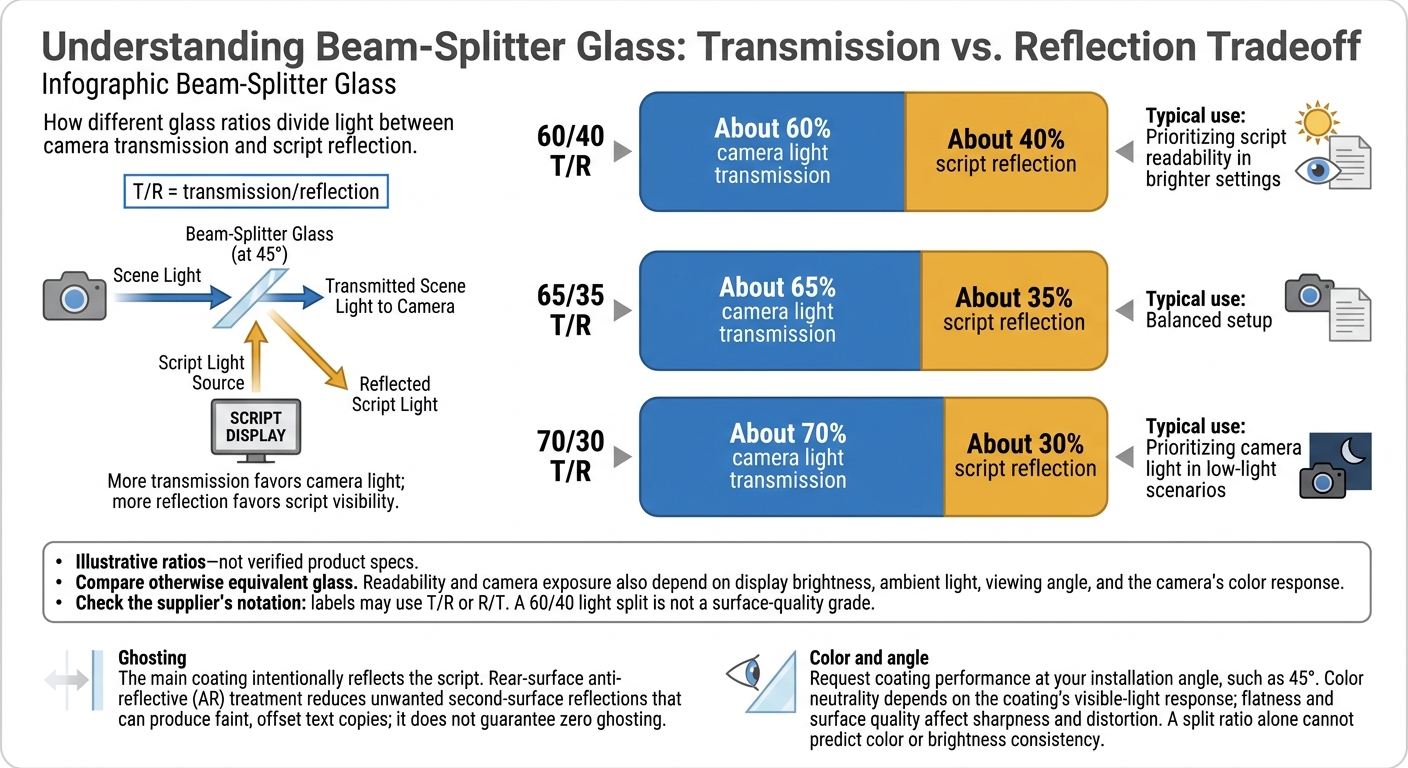
Beam-Splitter Glass Ratios: Camera Light vs. Script Reflection
Start with the light split, then check for side effects. Reflection redirects light off the glass, while transmission lets light pass through it. Coating layers control how much light reaches you and the camera.
Understanding 60/40, 65/35, and 70/30 Ratios
Check whether the supplier uses T/R (transmission/reflection) or R/T (reflection/transmission). Also confirm that “60/40” describes the light split - not a surface-quality grade. The T/R ratios below are examples, not verified product specs.
| Transmission/reflection (T/R) | Approximate script reflection | Camera light transmission | Typical use |
|---|---|---|---|
| 60/40 | About 40% | About 60% | Prioritizing script readability in brighter settings |
| 65/35 | About 35% | About 65% | Balanced setup |
| 70/30 | About 30% | About 70% | Prioritizing camera light in low-light scenarios |
These ratios only support comparisons between otherwise equivalent glass. Script readability and camera exposure still depend on display brightness, ambient light, viewing angle, and the camera’s color response.
Even a suitable split can fall short if rear-surface reflections bounce text back into the camera.
How Rear Anti-Reflective Treatment Reduces Ghosting
Anti-reflective (AR) treatment on the rear surface reduces unwanted reflections. The main coating reflects the script on purpose; rear-surface AR treatment reduces second-surface reflections that can cause ghosting - faint, offset copies of the text.
AR treatment can reduce ghosting, but it doesn’t guarantee its complete removal. Check that the supplier explicitly specifies rear-surface AR treatment.
Why Color Neutrality and Glass Angle Matter
Next, check whether the coating changes color or sharpness at your shooting angle. Color neutrality means preserving scene colors without adding a tint. It depends on the coating’s visible-light response, while glass flatness and surface quality affect sharpness and distortion.
Check coating specifications at your planned installation angle, such as 45°, then test with the lighting and angle you’ll use during filming. A ratio alone cannot predict color or brightness consistency.
When Premium Coatings Are Worth the Cost
After checking split ratio, ghosting, and color response, assess coatings by the problem they solve.
Pay for a documented improvement, not a higher-priced label. Color-critical product videos may justify more consistent color at the shooting angle. For wide-angle shots or large glass, check flatness too: coatings cannot fix substrate distortion.
4K and HDR do not automatically require premium coatings. These formats can make existing softness, tint, or reflections easier to spot. Let problems visible in your recorded footage guide the upgrade - not the recording format alone.
Coating Benefits and Tradeoffs to Compare
Ask for specifications measured at your intended angle. For color-sensitive work, look for broadband performance across 420–680 nm, backed by spectral data showing consistency. The word “broadband” alone isn't enough. Rear-surface antireflection (AR) figures should cover the stated wavelength range and angle, not just one wavelength.
Use these specs to compare measured performance rather than marketing claims.
| Performance factor | Potential benefit | Tradeoff or specification to verify |
|---|---|---|
| Ghosting control | Fewer unwanted secondary reflections | Rear-surface average reflectance below 0.5% across the stated range; this does not guarantee zero ghosting. |
| Camera light transmission | More light reaching the sensor | Tp above 95% for P-polarized light at the intended angle. |
| Image sharpness | Clearer text and less distortion | Surface flatness of λ/4 to λ/8 for larger glass. |
| Surface quality | Less light scatter and fewer artifacts | Surface quality of 40/20 or better; 60/40 is a looser specification. |
Check flatness and surface quality separately from coating performance. For larger glass, prioritize both across the full usable area, and pay for specs that address problems you can see in your footage.
On-Camera Tradeoffs to Test
Specs tell you what the coating should do. Testing the glass in your recording setup shows what it does on camera.
Testing Your Complete Recording Setup
Record the same script twice: once with the glass in place and once without it. Keep exposure and white balance locked, then compare the clips side by side for brightness, color tint, contrast, flare, and ghosting.
If the image looks too dark, increase the light on your subject before increasing ISO or gain. Watch for flare as you adjust the lighting.
Check script readability from your speaking position. If text looks doubled or areas appear washed out, check the glass angle and orientation against the manufacturer’s instructions. Inspect for fingerprints, dust, and scratches. Follow the manufacturer’s cleaning instructions before testing again.
Using Evelize to Test Script Readability
Tune readability before judging the glass. In Evelize, adjust font size, scrolling speed, and background colors at your recording distance. Keep the text readable without making the script too bright.
Use supported 4K, 60 FPS, or HDR modes to check footage for ghosting, flare, and reflections. Confirm which modes your device and camera hardware support; don’t assume they can all run at once. Use the app’s controls to improve readability - not to fix optical ghosting.
Specifications to Check Before Buying
Use your test results to check the vendor’s claims and match the spec sheet to problems you saw on camera. Buy for documented gains that suit your shoot, then test the full setup before important recordings.
- Check what the ratio labels mean. Ask how the spec sheet defines each ratio. Request measured performance at your intended angle rather than relying on the nominal label.
- Check rear AR reflectance and spectral neutrality. Request spectral reflectance and transmission data across 420–680 nm at your intended angle. Rear-surface reflectance below 0.5% is a premium benchmark.
- Verify surface quality and flatness. Ask for scratch-dig and flatness ratings. Common buyer benchmarks are 40/20 surface quality and λ/4 flatness.
- Confirm fit and mounting requirements. Check panel dimensions, tolerances, parallelism, and mounting method. Make sure the panel works with your frame and camera position.
Related Posts
Ready to Elevate Your Content?
Try Evelize for free and experience the easiest way to create, edit, and share professional videos. Script writing, teleprompter, and powerful video tools - all in one app!

