
Ultimate Guide to Repurposing Video Content
Ultimate Guide to Repurposing Video Content
Repurposing video content is a smart way to save time and maximize your reach across multiple platforms. Instead of creating new material for every channel, you can transform one video into various formats like short clips, blog posts, or podcasts. This approach helps you connect with diverse audiences, improve engagement, and boost SEO.
Key Takeaways:
- What it is: Repurposing means reformatting a single video to fit different platforms (e.g., TikTok, YouTube, blogs).
- Why it matters: Saves time, increases visibility, and helps reach different audience groups.
- How it works: Break videos into short clips, transcribe them into articles, or extract audio for podcasts.
- Tools to use: Apps like Evelize for recording, Descript for editing, and Repurpose.io for distribution.
By leveraging repurposing strategies, you can extend your content's lifespan and engage with your audience more effectively.
How to Repurpose ONE Video into 10+ Pieces of Content (Without Extra Work!)
Tools for Video Repurposing
Using the right tools can make video repurposing much faster and more efficient. With 90% of content marketers planning to incorporate AI by 2025, automation and smarter workflows are becoming the norm. But not all tools are created equal - some are designed for recording, while others specialize in editing, transcription, or distribution.
Evelize: Simplifying Professional Video Creation
To repurpose content effectively, you need high-quality source material, and that's where Evelize shines. This teleprompter app helps creators produce professional-grade videos without the hassle of complicated setups. It records in stunning 4K resolution at 60 FPS with HDR support, ensuring sharp visuals and vibrant colors.
Evelize’s built-in teleprompter allows you to read scripts directly on the screen while maintaining eye contact with the camera. You can customize the scrolling speed, font size, and background color to suit your speaking pace and lighting conditions. Once you've finished recording, the app offers tools to trim and crop your videos into formats tailored for platforms like TikTok (9:16), Instagram (1:1), and YouTube (16:9). It also keeps your scripts organized in one place, making it a complete solution for creating polished videos that are ready for repurposing.
Once you’ve got high-quality footage, the next step is refining it with advanced editing and transcription tools.
Editing and Transcription Tools
After recording, specialized tools can help you polish your content and prepare it for multiple platforms. AI-powered clipping tools like Opus Clip and Munch are particularly useful for identifying the most engaging moments in longer videos. These tools can save creators up to 200 hours annually. Opus Clip, for instance, boasts over 90% accuracy in detecting attention-grabbing segments and even assigns a "viral score" to predict performance. Subscriptions start at $12/month.
For videos with a lot of dialogue, like interviews or podcasts, text-based platforms like Descript let you edit by simply modifying the transcript. Delete a sentence in the text, and the corresponding video segment is removed. Descript also features voice cloning to correct narration errors without needing to re-record. Plans start at $12/month.
Other tools like Pictory ($19/month) can convert your video’s audio into blog posts, making it easier to repurpose content across mediums. Meanwhile, Repurpose.io ($15/month) automates distribution, letting you publish to platforms like YouTube, TikTok, and LinkedIn simultaneously. With 73% of consumers favoring short-form videos, these tools are essential for adapting your content to different formats quickly and efficiently.
How to Repurpose Video Content: Step-by-Step
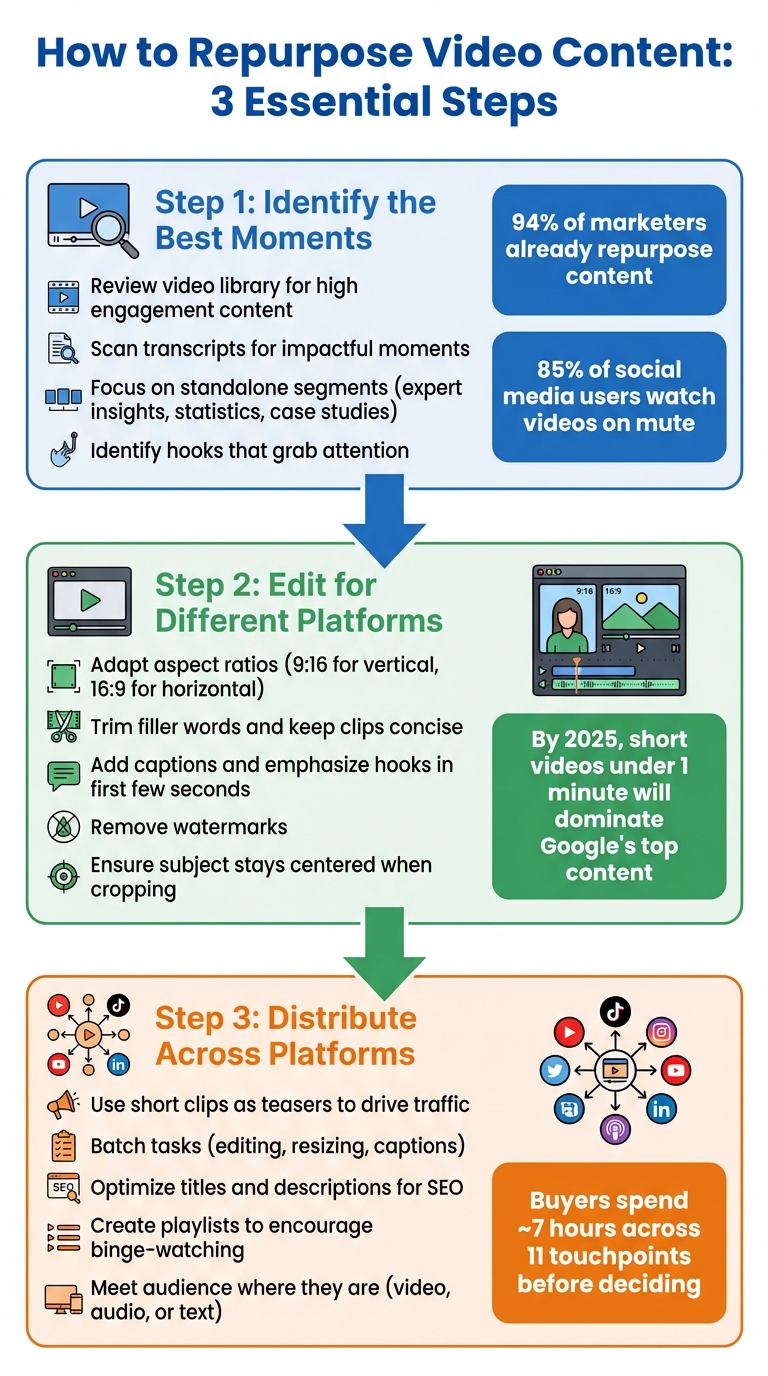
3-Step Video Content Repurposing Process: Identify, Edit, and Distribute
Transforming a single video into multiple pieces of content can significantly expand your reach and engagement. Here’s a practical guide to repurposing your video content effectively.
Step 1: Identify the Best Moments in Your Video
Start by reviewing your video library and pinpointing the standout segments. With 94% of marketers already repurposing content, the challenge lies in selecting the pieces worth reusing. Use your analytics to find videos with high watch time, engagement, or shares - these are your evergreen gems.
To save time, scan the transcript for the most impactful moments. Elizabeth Harris from Thinkific explains:
"Your aim is to pull the best nuggets of information, the juiciest quotes, and the key summary to re-use in new ways".
Focus on standalone segments that make sense independently, such as expert insights, compelling statistics, case studies, or clear explanations. Pay close attention to hooks - those captivating openers or intriguing questions that grab attention. Since 85% of social media users watch videos on mute, ensure these moments are visually engaging or include captions. If you're scripting future videos, plan for potential "micro-content" moments to streamline repurposing later.
Step 2: Edit for Different Platforms
Once you’ve identified the key segments, adapt them for each platform’s specific requirements. Social networks vary in their preferred formats - Instagram Reels and TikTok favor vertical video (9:16), while YouTube works best with horizontal (16:9). By 2025, short videos under one minute will dominate Google’s top-performing content, so prioritize creating bite-sized clips alongside longer ones.
Trim unnecessary filler words to keep your clips concise. Tools like Descript allow you to edit video by simply deleting text from the transcript, automatically syncing the changes to the visuals. Add captions and emphasize hooks within the first few seconds.
Be mindful of platform guidelines. Avoid watermarks, and if cropping horizontal videos to vertical, ensure the subject remains centered. With your clips polished and ready, it’s time to distribute them strategically.
Step 3: Distribute Across Platforms
Tailor your clips to each platform’s strengths for maximum visibility. Use short clips as "teasers" on social media to drive traffic back to your full-length video on YouTube or your website. This aligns with the "Zero Moment of Truth" principle, which suggests that buyers typically spend around 7 hours engaging with a brand across 11 touchpoints before making a decision.
Batch your tasks - editing, resizing, and adding captions - to save time. For email newsletters, link to your video using a thumbnail with a play button instead of embedding the full video, which can often be blocked.
Boost discoverability by optimizing for search. When uploading to YouTube, craft detailed titles and descriptions, and group related videos into playlists to encourage binge-watching. Repurpose video testimonials into quote graphics for Instagram or turn them into written case studies for your blog. The goal is to meet your audience where they are, offering content in the format they prefer - whether it’s video, audio, or text.
sbb-itb-4a26d6a
Ways to Repurpose Your Video Content
Now that you’re familiar with how repurposing works, let’s dig into some of the best ways to transform your videos into various formats. These methods not only help you connect with different audiences but also extend the lifespan of your content across multiple platforms.
Create Short Clips from Long Videos
Long-form videos are treasure troves for creating short, attention-grabbing clips. With short-form content gaining popularity, this approach is more relevant than ever.
Look for the "golden nuggets" in your video - those standout moments like expert insights, clear explanations, or memorable anecdotes that can hold their own. These snippets should hook viewers within the first few seconds.
To optimize for platforms like Instagram Reels, TikTok, and YouTube Shorts, convert your horizontal footage into a vertical (9:16) format. Many tools now use AI to keep your subject centered during this process. For YouTube creators, the "Remix" button in the mobile app allows you to edit your uploaded videos into 60-second Shorts without needing extra software.
Save time by batching your workflow. Dedicate a session to pulling clips from multiple videos, resizing them for different platforms, adding captions, and scheduling them all at once. Lewis Howes, author and podcast host, shared:
"It used to take days to create clips. Now it takes us minutes to create them".
Platform limits vary: YouTube Shorts cap at 60 seconds, Instagram Reels can go up to 3 minutes, and TikTok allows up to 10 minutes. These short clips act as teasers, driving viewers to your full-length videos while reinforcing your key message.
Turn Videos into Blog Posts and Articles
Your video content can also serve as the foundation for detailed written content. Transcripts of your videos can be turned into blog posts, making your material accessible to readers who prefer text. This strategy pays off - businesses with blogs get 55% more site visitors than those without.
Start with your video transcript and edit it for readability. Break it into clear sections that align with the video’s main points. To enhance the post, add visuals from the video, like screenshots, slides, or infographics, to provide context and keep readers engaged.
Embed the original video within the blog post for added value. This gives readers the option to watch or read while boosting SEO for both the video and the page by increasing dwell time. Include updates, expert quotes, or bonus tips not covered in the video to offer something extra.
Tailor the content format to your audience. A tutorial video could become a step-by-step guide on your blog, a Q&A post for social media, or a thought leadership piece for LinkedIn. Always include a call-to-action encouraging readers to watch the video and vice versa to maximize engagement across platforms.
Extract Audio for Podcasts
Repurposing video content as audio opens doors to new audiences, especially for those who prefer listening while commuting, working out, or doing chores. With over 4 million podcasts available online, this format is thriving. As Pictory points out:
"Audio content has become a hugely lucrative space for brands to connect with different audiences".
To ensure high-quality audio, use video sources in 1080p or higher. Export audio as MP3 for streaming or WAV for lossless quality. For MP3 files, aim for a bitrate between 192–256 kbps to maintain voice clarity.
AI-powered tools can help clean up the audio by removing background noise and filler words like "um" and "like". Since listeners don’t have visual cues, add intros and outros to provide context and clear calls to action. Generating a transcript of the audio also boosts SEO, improves accessibility, and can serve as a base for future blog posts.
Before exporting, check the audio levels. If the sound is too quiet, adjust the volume or use normalization tools to avoid clipping or distortion. These small details ensure a polished experience for your listeners across all podcast platforms.
How to Optimize Content for Each Platform
Making sure your repurposed videos are tailored for each platform is key to maximizing reach and engagement.
Adjust Content for Platform Requirements
Every platform has its own set of rules and audience expectations. Erin Weaver from Group Nine Media sums it up perfectly:
"Make your content work for the platform, don't make the platform work for your content".
Start by tweaking your video’s aspect ratio and length to fit platform guidelines. For vertical formats, stick to 9:16, while 16:9 works best for horizontal layouts. LinkedIn allows some flexibility, supporting 16:9, 1:1, or 4:5 formats, which suit its professional audience. On Facebook, you can go for 1:1 or 4:5 for feed posts. Video length matters too - YouTube Shorts are capped at 60 seconds to 3 minutes, TikTok videos can now run up to 60 minutes, and Instagram Reels support up to 15 minutes.
Make use of native editing tools on each platform, like fonts, stickers, music, and filters. This not only makes your content feel more authentic but also aligns better with platform algorithms. If reposting videos, ensure watermarks are removed - platforms often deprioritize content with visible watermarks. Tools like SnapTik can help with this.
Don’t skip captions. About 85% of social media users watch videos without sound, so subtitles can dramatically improve accessibility and engagement. For vertical videos, avoid placing text or logos in the top 14% and bottom 20% of the screen since those areas are often blocked by profile icons or buttons.
| Platform | Recommended Aspect Ratio | Max Video Length | Best Practice |
|---|---|---|---|
| YouTube (Standard) | 16:9 | 12 hours (Verified) | Use detailed tags and playlists |
| YouTube Shorts | 9:16 | 60 seconds to 3 minutes | High-energy, quick edits |
| Instagram Reels | 9:16 | Up to 15 minutes | Remove watermarks; use native text |
| TikTok | 9:16 | 10 to 60 minutes | Use trending music and high energy |
| 16:9, 1:1, or 4:5 | 10 to 30 minutes | Maintain a professional tone | |
| Facebook Feed | 1:1 or 4:5 | 240 minutes | Ideal for community building and ads |
Once your content is optimized, it’s time to evaluate how it performs.
Track Performance and Review Results
After tailoring your videos for each platform, monitoring their performance is essential for fine-tuning your strategy. Don’t just focus on view counts - dig deeper into metrics like engagement rate (likes, shares, comments, and saves), watch time, completion rate, and click-through rates (CTR) to your website or full-length videos. Use tools like YouTube Analytics, Instagram Insights, and Facebook Insights to uncover demographic and engagement trends. Interestingly, about 88% of companies rely on data to shape their content strategies.
If your goal is to drive website traffic, set up Google Analytics to track referral traffic and conversions from each platform.
Pay attention to the formats and topics that resonate most. For example, if short tutorial clips perform well on Instagram, prioritize creating more of those. Similarly, if LinkedIn audiences engage more with professional, educational content, adjust your focus accordingly. This data-driven approach helps you understand what’s working and guides your next steps.
To stay organized, maintain a video bank - whether it’s a spreadsheet or a tool like Notion - to track your video assets and their repurposing status across platforms. This prevents duplication and highlights evergreen content that could use a refresh. The ultimate goal? Keep improving. Experiment with different formats, analyze the results, and refine your strategy to keep your audience engaged.
Conclusion
Using Repurposing to Grow Your Audience
Repurposing video content is a smart way to broaden your reach across multiple platforms. Did you know that 91% of businesses use video, and 94% of marketers repurpose their content? By taking a single video and transforming it into formats like short clips, blog posts, podcasts, or social media snippets, you can connect with your audience wherever they spend their time.
Short-form videos, in particular, deliver the best ROI among social media content types. Adding podcasts into the mix can also increase campaign success by up to 40%. As Amy Woods, CEO of Content 10x, puts it:
"Repurposing video content frees your strategy from relying strictly on an audience of YouTube fans or video lovers to discover your content."
Repurposing doesn’t just enhance visibility; it also strengthens your SEO. By creating topic clusters around a single subject, you can boost search rankings and attract more organic traffic. Use these tactics to refine your strategy and drive engagement across every channel.
Get Started with Evelize
Evelize simplifies video creation and repurposing, helping you save time while producing high-quality content. With features like 4K resolution, 60 FPS recording, HDR support, and customizable teleprompter settings, you can create polished videos ready for any platform. Built-in editing tools, social media presets, and script organization features make it easy to go from filming to publishing in no time.
Ready to maximize your content's potential? Start with a 3-day free trial of Evelize Pro and enjoy watermark-free exports, advanced editing tools, and more. Whether you're crafting in-depth tutorials for YouTube or quick, vertical clips for TikTok and Instagram Reels, Evelize gives you the tools to work efficiently and effectively. Visit evelize.com today and turn every video into a content powerhouse.
FAQs
How do I pick the best parts of my video to repurpose?
To pick the best moments for repurposing, start by watching your video all the way through and jotting down any parts that grab attention. These could be visually striking, emotionally impactful, or include a strong call-to-action. Focus on segments that convey a complete thought or tip, making them perfect for sharing as standalone content.
Then, think about how each clip connects with your audience’s preferences and the platform you’re planning to use. For instance, an energetic, fast-paced clip might shine on TikTok, while a more in-depth takeaway could be ideal for LinkedIn. Make sure the content matches the platform’s format - like vertical videos for Instagram Stories or short, snappy clips for Reels.
A tool like Evelize can make this process smoother by letting you tag and organize key moments directly in your workflow. This way, editing and sharing your content becomes much more efficient.
What tools do I need to repurpose video content efficiently?
Repurposing video content can be a game-changer, but having the right tools makes all the difference. AI-powered clipping tools are a great starting point - they can automatically pick out the most engaging parts of your videos and turn them into bite-sized clips for platforms like TikTok, Instagram Reels, or YouTube Shorts. These tools save time while ensuring your content grabs attention.
Another must-have? Transcription and captioning tools. They not only convert spoken audio into text but also make adding subtitles a breeze. Some even let you tweak your video by editing the transcript, which is both efficient and makes your content more accessible. For visual tweaks, design-focused editors are a go-to. These allow you to resize videos, add branding, and create eye-catching thumbnails tailored for each platform.
If you're creating original content, a teleprompter app like Evelize can seriously elevate your production. It helps you deliver scripts smoothly while offering features like 4K resolution, 60 FPS, and HDR support for professional-looking videos. By combining these tools, you can quickly turn one video into a variety of platform-ready assets without sacrificing quality.
How do I tailor repurposed videos for different social media platforms?
To make the most of repurposed videos, it's essential to tailor them to each platform's format preferences and audience expectations. For instance, TikTok and Instagram Reels thrive on vertical 9:16 videos that are under 60 seconds long. YouTube Shorts also favors the 9:16 format but allows videos up to 60 seconds. Meanwhile, platforms like Facebook and LinkedIn often perform better with horizontal (16:9) or square (1:1) videos that can run a few minutes longer. Always aim for high-quality resolutions like 4K or 1080p and stick to a frame rate of 30 or 60 FPS to ensure your videos look crisp and professional.
Take it a step further by customizing your content with platform-specific elements. Add bold opening hooks to grab attention, include subtitles to cater to sound-off viewers, and design thumbnails that fit each platform's style. Adjust captions, hashtags, and calls-to-action to match the platform's vibe - keep it short and playful for TikTok, professional for LinkedIn, and more community-focused for Facebook. Tools like Evelize can simplify the process with features like teleprompter support, 4K recording, and user-friendly editing options, making it easier to adapt your videos for multiple channels.
Timing also plays a big role in engagement. Schedule your posts during peak U.S. activity times, such as 8:00 a.m.–10:00 a.m. or 7:00 p.m.–9:00 p.m. EST. Keep an eye on analytics to refine your strategy and boost performance across platforms.
Related Posts
Ready to Elevate Your Content?
Try Evelize for free and experience the easiest way to create, edit, and share professional videos. Script writing, teleprompter, and powerful video tools - all in one app!


